

Web Portal vs Website: 10 Key Differences and How to Choose the Right One in 2026

The key difference between a web portal and a website is access and personalization. A website delivers the same public content to every visitor without requiring login. A web portal requires authentication and provides personalized, role-based access to tools, data, and services from multiple sources through a single secure interface. Choose a website when you need to inform a broad audience. Choose a portal when users need to interact, collaborate, or access private data.
If you are planning to build a digital platform for your business, one of the first decisions you will face is whether you need a website, a web portal, or both. It is a question that trips up business owners, product managers, and even some developers — because on the surface, websites and web portals can look similar. Both live on the internet, both are accessed through browsers, and both serve business goals.
But under the hood, they are fundamentally different in purpose, architecture, functionality, and cost. Choosing the wrong one means wasted budget, poor user adoption, or a platform that cannot scale with your operations. At Impex Infotech, a best website company in India, we build both websites and web portals for clients across the USA, Australia, and India — and the single most impactful advice we give is: understand what you actually need before you start building.
This guide breaks down every meaningful difference between web portals and websites, with real-world examples, a cost comparison, and a clear decision framework to help you choose the right platform for your business.
What Is a Website?
Website: A collection of publicly accessible web pages hosted under a single domain name, designed to provide information, showcase products or services, and attract visitors through search engines and marketing. Websites are built for a broad audience and typically do not require user login to access content.
A website is like a digital brochure or storefront. It presents information — text, images, videos — to anyone who visits. Whether you are a first-time visitor or a returning customer, you see the same content. Websites are primarily one-way communication tools: the business publishes content, and the visitor consumes it.
Common examples include company homepages, blogs, portfolio sites, landing pages, product catalogs, and news publications. The primary goals of a website are to build brand awareness, attract organic traffic through SEO, generate leads through forms, and provide basic information about a business.
What Is a Web Portal?
Web Portal: A secure, centralized web-based platform that requires user authentication and delivers personalized access to tools, data, services, and applications from multiple sources through a single interface. Portals provide different experiences to different users based on their role, permissions, and preferences.
A web portal is like a personalized workspace. When you log in, you see content, tools, and data tailored specifically to you. A customer sees their orders and support tickets. An employee sees their pay stubs and company announcements. A student sees their courses and grades. The same portal serves different content to different users — that is the fundamental distinction from a website.
Web portals aggregate information from multiple backend systems — CRM, ERP, databases, APIs, document management — into one unified interface. This eliminates the need for users to switch between multiple applications to get their work done.
10 Key Differences: Web Portal vs Website
1. Access and Authentication
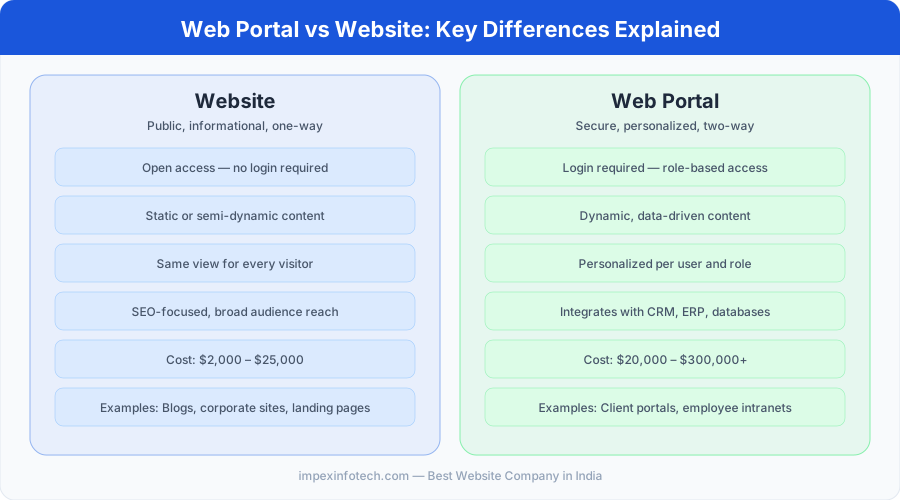
Website: Open to everyone. No login required. Anyone with the URL can access all content. Portal: Requires authentication. Users must log in with credentials, and what they see depends on their role and permissions. A customer portal shows different data than an employee portal, even within the same platform.
2. Personalization
Website: Same content for every visitor (except minor geo-based variations). Portal: Fully personalized experience. Each user sees content, dashboards, tools, and notifications tailored to their profile, role, department, or account status.
3. Communication Direction
Website: Primarily one-way — the business publishes, the visitor reads. Interaction is limited to contact forms or chat widgets. Portal: Two-way and multi-directional. Users submit data, upload documents, message other users, collaborate on projects, and interact with business systems in real time.
4. Content Type
Website: Static or semi-dynamic content — blog posts, product descriptions, about pages, images, and videos. Portal: Dynamic, data-driven content — real-time dashboards, transaction histories, document libraries, report generators, and interactive tools pulled from databases and APIs.
5. Integration Complexity
Website: Minimal integrations — typically just analytics (Google Analytics), email marketing tools, and perhaps a CRM form. Portal: Deep integrations with CRM systems (Salesforce, HubSpot), ERP platforms (SAP, Oracle), payment gateways, databases, document management systems, notification services, and third-party APIs.
6. Security Requirements
Website: Standard security — SSL certificate, basic form validation, spam protection. Portal: Enterprise-grade security — role-based access control (RBAC), multi-factor authentication (MFA), data encryption at rest and in transit, audit logging, session management, and compliance with standards like HIPAA, GDPR, or SOC 2 depending on the industry.
7. User Roles
Website: One user type — the visitor. Everyone sees the same interface and content. Portal: Multiple user roles — admin, manager, employee, customer, vendor, partner — each with different permissions, views, and capabilities within the same platform.
8. Development Complexity and Cost
Website: Relatively straightforward to build. A professional business website costs $2,000–$25,000 and can be built with WordPress, Webflow, or static site generators. Portal: Significantly more complex. A custom web portal costs $20,000–$300,000+ depending on features, integrations, and security requirements. Portals require backend engineering, database design, API development, and ongoing maintenance.
9. SEO and Discoverability
Website: Designed for search engines. Pages are publicly indexed by Google, and SEO is a primary traffic strategy. Portal: Not designed for SEO. Portal content sits behind a login wall and is not indexed by search engines. Discovery happens through direct links, invitations, or the associated public website.
10. Maintenance and Updates
Website: Maintenance is relatively light — content updates, plugin patches, hosting management. Annual maintenance costs typically run $500–$5,000. Portal: Maintenance is ongoing and critical — security patches, API updates, performance optimization, feature enhancements, database scaling. Annual maintenance costs run $10,000–$100,000+ for enterprise portals.
The simplest way to remember the difference: a website is for people who don’t know you yet (marketing, discovery, SEO). A portal is for people who already have a relationship with you (customers, employees, partners). Most businesses eventually need both — a public website to attract visitors, and a portal to serve and retain them.
Side-by-Side Comparison Table
| Criteria | Website | Web Portal |
|---|---|---|
| Access | Public, no login | Login required, role-based |
| Personalization | Same for all visitors | Unique per user/role |
| Communication | One-way (read-only) | Two-way (interactive) |
| Content | Static / semi-dynamic | Dynamic, data-driven |
| Integrations | Minimal (analytics, forms) | Deep (CRM, ERP, APIs, DBs) |
| Security | Standard SSL | RBAC, MFA, encryption, compliance |
| User Roles | One (visitor) | Multiple (admin, user, vendor…) |
| SEO | High priority, publicly indexed | Not indexed, behind login |
| Development Cost | $2K – $25K | $20K – $300K+ |
| Maintenance | $500 – $5K/year | $10K – $100K+/year |
| Primary Goal | Attract, inform, convert | Serve, retain, empower |
| Examples | Blogs, corporate sites, landing pages | Client portals, intranets, dashboards |
Types of Web Portals (With Real Examples)
| Portal Type | Purpose | Real-World Example |
|---|---|---|
| Customer Portal | Self-service account management, support | MyVodafone, Amazon Account |
| Employee/HR Portal | Payroll, leave, company info, training | Workday, BambooHR |
| Patient Portal | Medical records, appointment booking | MyChart (Epic), Medicare (AU) |
| Student Portal | Courses, grades, enrollment | Blackboard, Canvas |
| B2B Partner Portal | Vendor management, order tracking | Salesforce Partner Portal |
| Government Portal | Citizen services, forms, applications | USA.gov, myGov (Australia) |
| E-commerce Marketplace | Multi-vendor selling platform | Amazon Seller Central |
| Intranet Portal | Internal communication, knowledge base | SharePoint, Notion (enterprise) |
Types of Websites (With Real Examples)
| Website Type | Purpose | Real-World Example |
|---|---|---|
| Corporate/Business | Company information, services, credibility | Apple.com, IBM.com |
| E-commerce Store | Sell products online | Shopify stores, Nike.com |
| Blog/Content | Publish articles, attract organic traffic | HubSpot Blog, Medium |
| Portfolio | Showcase work for freelancers/agencies | Behance profiles, Dribbble |
| Landing Page | Convert visitors for specific campaigns | Product launch pages |
| News/Media | Publish and distribute news content | BBC, The Guardian, NDTV |
When to Choose a Website
- You want to establish an online presence and build brand credibility.
- Your primary goal is to attract new visitors through Google search (SEO).
- You need to showcase products, services, or portfolio work to a broad audience.
- Visitors do not need to log in, submit data, or interact with backend systems.
- Your budget is under $25,000 and you need to launch quickly.
- You are a small business, freelancer, startup, or local service provider.
When to Choose a Web Portal
- Users need to log in and see personalized content, data, or dashboards.
- You need to integrate with CRM, ERP, payment, or other business systems.
- Different users need different access levels (admin, customer, vendor, employee).
- Users need to submit, upload, or interact with data — not just consume content.
- You handle sensitive information requiring encryption, audit logging, and compliance.
- You are replacing manual processes (email-based workflows, spreadsheet tracking) with a centralized digital platform.
Decision Framework: Website or Portal?
Use this simple flowchart to determine which platform fits your needs:
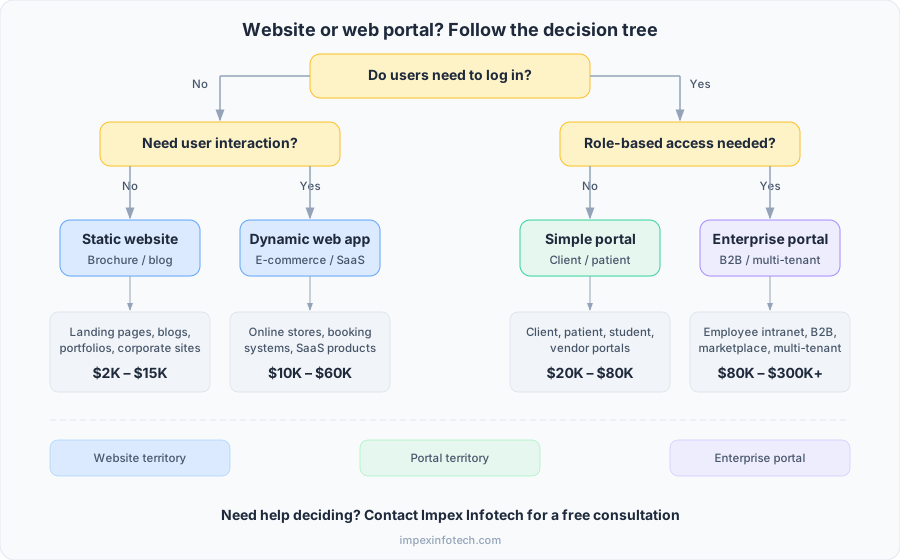
Many businesses start with a website and add a portal later as their operations grow. For example, a law firm might launch a marketing website first, then build a client portal for secure document sharing and case tracking once they reach 50+ active clients. At Impex Infotech, we design website architectures that make it easy to add portal functionality later — so you do not have to rebuild from scratch when the time comes.
Cost Comparison: Website vs Web Portal
| Cost Factor | Website | Web Portal |
|---|---|---|
| Initial Development | $2,000 – $25,000 | $20,000 – $300,000+ |
| Design (UX/UI) | $1,000 – $8,000 | $5,000 – $40,000 |
| Annual Maintenance | $500 – $5,000 | $10,000 – $100,000+ |
| Hosting | $10 – $200/month | $100 – $2,000+/month |
| Security | SSL + basic (included) | $2,000 – $20,000+ (compliance) |
| Timeline to Launch | 2 – 8 weeks | 8 – 40 weeks |
| WordPress Option | $2,000 – $10,000 | $8,000 – $30,000 (with plugins) |
For businesses in India, development costs can be 40–60% lower than US or Australian rates while maintaining comparable quality — making custom portal development accessible for mid-sized organizations that might otherwise rely on off-the-shelf SaaS platforms.
Can You Have Both? (Yes — And You Probably Should)
Most successful digital businesses use both a website and a portal, working together as complementary platforms:
- The website handles marketing, SEO, brand awareness, and lead generation. It is public-facing, optimized for Google, and designed to attract new visitors and convert them into customers.
- The portal handles operations, service delivery, and customer retention. It sits behind a login, provides personalized dashboards, and empowers users to self-serve instead of contacting support.
The two platforms link together — the website drives users to sign up or log in, and the portal delivers the value that keeps them coming back. This is the model used by companies like Xero (marketing website + accounting portal), Canva (public site + design tool portal), and Zoho (product pages + CRM/HR/project portals).
At Impex Infotech, we frequently build integrated solutions where the public website and the authenticated portal share the same design system and are deployed from a unified codebase — reducing development cost and ensuring brand consistency across both experiences.
💡 Think of your website as the front door and your portal as the workspace inside. You need both to run a modern digital business.
- A website is public and delivers the same content to everyone. A web portal is private and delivers personalized, role-based experiences.
- Websites are for attracting new visitors (marketing, SEO). Portals are for serving existing users (customers, employees, partners).
- Portals require authentication, integrate with business systems, and cost significantly more to build and maintain than websites.
- Website development costs $2K–$25K. Portal development costs $20K–$300K+ depending on complexity.
- Most businesses need both — a website for discovery and a portal for operations.
- Start with a website if you are early-stage. Add a portal when your user base and operational complexity demand it.
- Design your website architecture to support future portal functionality, avoiding costly rebuilds later.
Not Sure If You Need a Website, Portal, or Both?
Impex Infotech builds both websites and web portals for businesses across the USA, Australia, and India. We help you choose the right platform based on your business goals — and build it to scale.
Get a Free ConsultationFrequently Asked Questions
A website delivers public content to all visitors without requiring login. A web portal requires user authentication and provides personalized, role-based access to tools, data, and services. Websites inform; portals empower users to interact and transact.
Technically yes — a web portal is accessed through a web browser like a website. However, functionally they are very different. A portal is a specialized web application with authentication, personalization, role-based access, and system integrations that standard websites do not have.
Yes, WordPress can be used for simple portals using plugins like BuddyBoss, MemberPress, or WP-Client. This works well for client portals, membership sites, and basic dashboards. For complex enterprise portals with deep integrations, custom solutions built with React, Node.js, or Laravel provide better performance and flexibility.
A professional website typically costs $2,000–$25,000 to build. A custom web portal costs $20,000–$300,000+ depending on feature complexity, integrations, security requirements, and user roles. WordPress-based portals can be built for $8,000–$30,000 as a middle-ground option.
Most growing businesses eventually need both. The website handles marketing, SEO, and attracting new visitors. The portal handles operations — customer self-service, employee workflows, partner collaboration. They work as complementary platforms linked by login and signup flows.
Common examples include customer self-service portals (MyVodafone), employee HR portals (Workday, BambooHR), patient portals (MyChart), student portals (Blackboard, Canvas), government portals (USA.gov, myGov Australia), and B2B partner portals (Salesforce Partner Portal).
Web portals require significantly stronger security because they handle sensitive user data. This includes role-based access control, multi-factor authentication, data encryption, audit logging, and compliance with regulations like HIPAA or GDPR. Websites typically need only standard SSL and basic form protection.
It depends on how your website was built. WordPress sites can be extended with portal plugins for simpler use cases. Custom-coded sites may need significant backend work to add authentication, user roles, dashboards, and integrations. The best approach is often to build the portal as a separate application that shares design elements and login with your existing website.
References & Further Reading
- Web Accessibility Introduction — W3C (World Wide Web Consortium)
- Australian Privacy Act — Office of the Australian Information Commissioner
- GDPR Official Guide — European Union
- MDN Web Docs — Mozilla Developer Network
Recent Posts
How to Deploy Projects on Vercel with GitHub: A Beginner’s Guide
How to Deploy Projects on Vercel with GitHub: A Beginner's Guide ⏱ 16 min read · Includes a section on...
Read More
How to Use AI for Social Media Marketing to Boost Engagement
How to Use AI for Social Media Marketing to Boost Engagement ⏱ 15 min read · Includes a step-by-step section...
Read More
SEO vs AEO vs GEO 2026 Does Your Business Need All Three
SEO vs AEO vs GEO in 2026: What Do They Mean and Does Your Business Need All Three? A plain...
Read MoreRecent Posts
How to Deploy Projects on Vercel with GitHub: A Beginner’s Guide
How to Deploy Projects on Vercel with GitHub: A Beginner's Guide ⏱ 16 min read · Includes a section on...
Read More
How to Use AI for Social Media Marketing to Boost Engagement
How to Use AI for Social Media Marketing to Boost Engagement ⏱ 15 min read · Includes a step-by-step section...
Read More
SEO vs AEO vs GEO 2026 Does Your Business Need All Three
SEO vs AEO vs GEO in 2026: What Do They Mean and Does Your Business Need All Three? A plain...
Read More